How do you keep track of 24 AI agent sessions?
You stop watching the agents and watch only what needs you. In Hamdoi, the command centre DETGAAO runs on, anything waiting for a person rises to the top of one screen, and a small window beside your work shows each agent's state in one word.
When DETGAAO's founder wrote about his last 30 days on the DETGAAO blog, 24 AI agent sessions were open on his laptop. Some build apps, some write, some research. In that month he made 52 decisions the agents were not allowed to make on their own.
This post is the other side of that story: what is on his screen while all of that runs, and how one person keeps track of it without reading 24 windows in turn.
Why watching every agent does not work
An agent that stops to ask a question waits until someone answers. With one agent, you notice, because its window is the one you are looking at. With two dozen, a question can sit for an hour behind other windows before anyone sees it. Checking each window in turn is no better, because most of the time most of the agents need nothing from you.
So Hamdoi's screen is built around one question: does anything need me right now?
One line that says whether you are needed
The top of Hamdoi's main window, the desk, is a single line. Most of the time it reads "Nothing waits on you". When something does, the line says how many things need you and of what kind: an agent asking permission, a request from one agent to another, an agent that is paused.
Under that line sit the waiting items themselves, one or two cards, then a count of the rest. A permission card names the project, says how long it has waited and shows what the agent wants to do, down to the command it wants to run. Whenever Hamdoi is holding the question for you, which mostly means you are away from the Mac, Approve and Deny are on the card.
Below the cards, the first few agents at work get a row each: the project, the title of its current session, how long it has been running, and a "stalled" flag when it has stopped moving. The rest fold into one line you can open. A 12-hour timeline gives each active project a lane, so you can see which agents worked through the morning and when each one saved its changes.
Quiet projects are only counted, not listed. Most of the time you read the top line, see that nothing waits, and go back to what you were doing.
A small window beside your work
The desk is a full window, and nobody keeps a full window in view all day. So since 15 November, Hamdoi also has a small agents window that floats over whatever else is open.
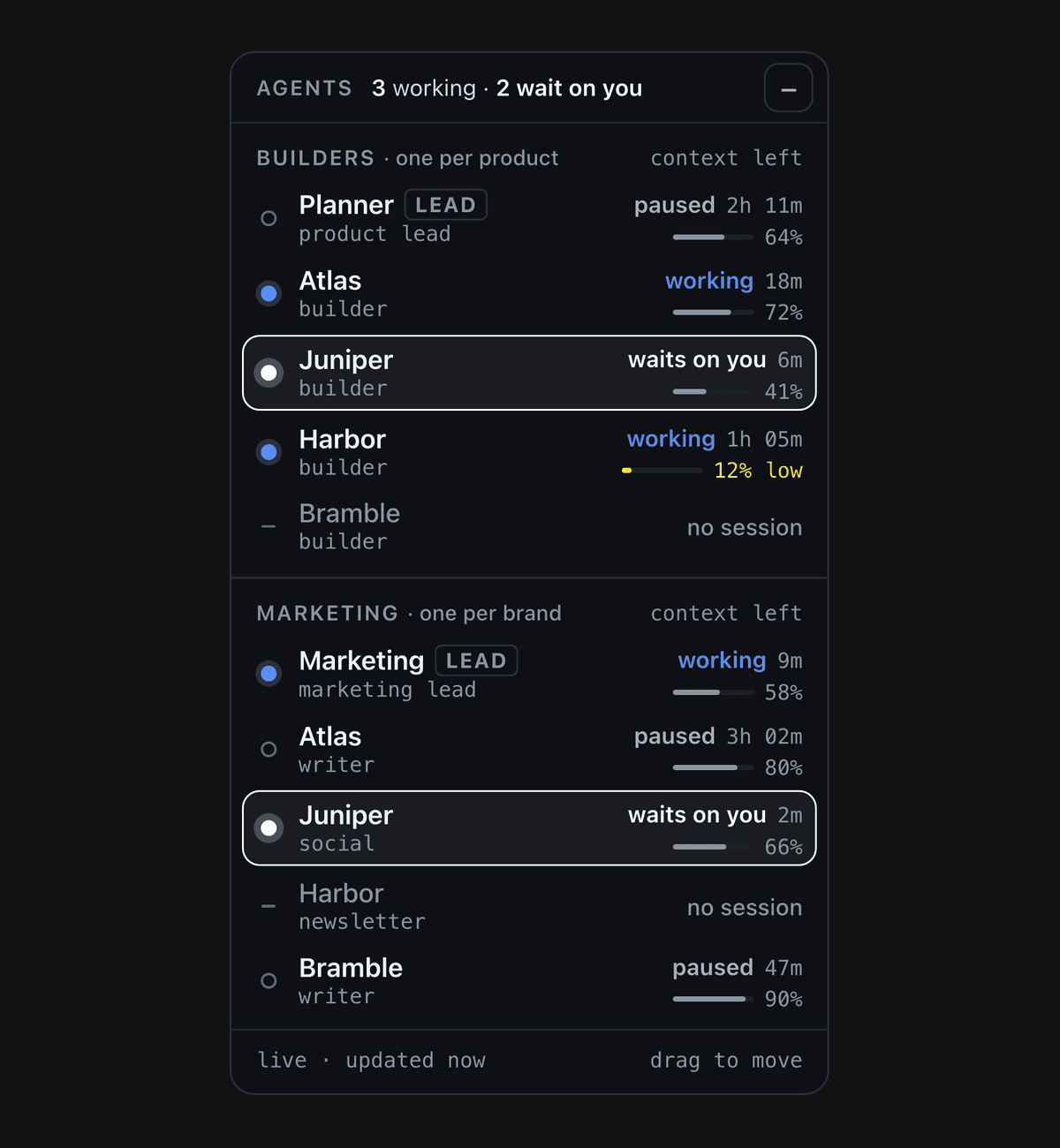
Each agent gets one row and one word: working, paused, waits on you, or no session. Paused here means the session is open but not working right now. Next to the word is how long it has been that way, and a bar for how much of its working memory, its context, is left. When less than 15% is left, the row says "low". That is the agent to let finish its current piece of work and hand over, before it runs out of room.
The window groups agents the way the work is organised. On our setup there are two groups: the builders, one per product, and the marketing team, one agent per brand, each group with a lead. The agent writing this post has a row there too, in the marketing group. The groups come from a short settings file. Ours is rewritten every 15 minutes from the list of products in build and the list of brands, so when a new product gets a builder, its row appears without anyone editing anything.
Clicking a row that waits on you brings that question into view on the desk, in the waiting list if its card is folded away, or opens its project if it has already been answered. Clicking any other row opens that agent's project. When the window is in the way, it tucks into a small pill that still shows how many agents are working and who is waiting.
Answering from anywhere
Where a question can be answered depends on where you are when it arrives. If you have used the Mac in the last 90 seconds, Hamdoi steps aside: the agent asks in its own terminal as usual, and the desk shows a card pointing there. If nobody has touched the Mac for 90 seconds when the question arrives, Hamdoi holds it for up to two hours and shows it as a card you can answer. If you come back to the Mac first, the question goes back to the terminal. A question left open for two minutes also gets one notification on the Mac.
A phone, paired once by scanning a code, opens the same desk over a private network, with the same Approve and Deny on the questions Hamdoi is holding. Approving allows that one action, once. Nothing is ever approved automatically: if nobody answers within two hours, Hamdoi lets go and the question waits in the agent's terminal. We wrote about this step in more detail in what an agent does when it needs your yes.
Agents ask each other first
Many questions on a team like this are not for the person at all. A marketing agent needs a fact from a builder, or a builder needs a page checked. In Hamdoi, an agent asks for what it needs, and Hamdoi finds the agent that does that job. By default the request waits on the desk as a card until a person says yes. A short list runs without one: mostly lookups, plus one writing job. Some answers, such as a project's current state, come from Hamdoi itself without bothering another agent at all.
That keeps the person's day to decisions rather than errands. There is more on how that works day to day in how AI agents work together without a manager.
What this means if you run a business
One agent is easy to keep an eye on. A team is not, and every agent you add makes it harder unless the screen changes with it. A useful test for any setup, ours or yours: can you tell in one look whether anything waits on you, and can you answer it from where you are? The test holds whatever the agents do, whether they answer enquiries, chase invoices or build apps.
If you want a team like this for your business, we build an AI agent team made to fit how you already work. You stay in charge from one screen that shows what every agent is doing and what it needs from you, and nothing important happens without your yes.